

Oracle Pricing (Qualifier & Modifier)
Oracle Advanced Pricing provides a logical, flexible setup framework to handle complex pricing scenarios. It enables to break price creation into simple elements: define pricing rules, assign rules to create specific pricing actions, and designate pricing controls. Oracle Advanced Pricing also supports tailored pricing with built-in extensibility features.
Oracle Advance Pricing is part of Oracle Order Management, and integrates seamlessly with other Order Management applications, including Configurator and Order Management.
REQUIRMENT: For customer Bigmart (Customer Number 1168) give 10% discount on the unit price of the items present on sales order.
To fulfill this requirement one Qualifier and one Modifier need to be defined.
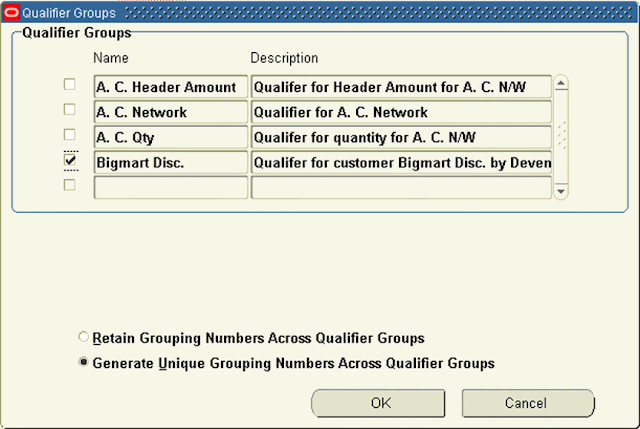
Pricing qualifiers controls, who is eligible for certain prices (price lists) and benefits.
The modifier provides price adjustments such as discounts, price breaks, surcharges, coupons, item and term substitutions, and other item discounts. Discount and surcharges modifiers affect the selling price; freight charge modifiers do not affect the selling price.
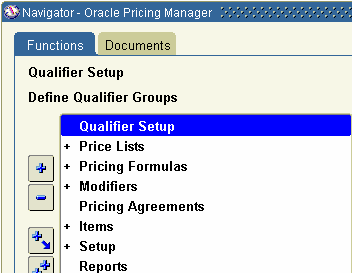

As this qualifier is newly defined we need to run one concurrent request “Build Attribute Mapping Rules”. This request needs to be run on defining new qualifier, it is always recommended to run the same after doing change in the qualifier.


Defined Modifier: Disc. Bigmart
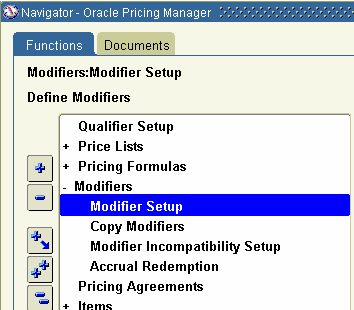
The requirement is to give 10% to all the line. So select Level as ‘Line’ to apply modifier at line level. Even though it is for all the lines there is a difference in giving 10% discount at all lines level and giving discount at header level. If it would be at Header level 10% will be given to charges also along with items. Also provide all other values relevant to the requirement as shown.

>

Attach Qualifier to the modifier: Click on ‘Line Qualifiers’ button to attach “Bigmart Disc.” to “Disc. Bigmart”.

Sales Order 56771 is entered before creating the Modifier:


Sales Order 56772 is entered after creating the Modifier:


See the difference in prices at line level on two Orders. On sales order 56772 unit price is 1,439.10, which came after 10% discount on the real price (i.e. 10% discount on 1599.00) and on Sales Order 56772 unit price is 1,599.00


Hi,
ReplyDeleteIts a nice and detailed post.I have small doubt here ,You have not attached the qualifer to the
Price list 'corporate'.so this qualifer is linked to the give price list.It will work for any price list if we define the modifieer as 'automatic'
Thanks in advance.
Koushik.
Hi Koushik,
ReplyDeleteAs the case explained here is only related to customer present on the order, no specific price list is mentioned. Hence Oracle will calculate the discount for customer Bigmart depending on the modifier, irrespective of price list selected.
Thanks
DEVendra
Can't get 2 header level charges to work.
ReplyDeleteHi,
ReplyDeleteCould you please elaborate the issue little more?
Thanks
Devendra
Hey,
ReplyDeleteCould you please post some tutorial on creating Dynamic Formula and get_custom_code()
Hi, can you please tell me how to create a qualifier attribute for customer bill to state when pricing engine is called from HTML quoting.
ReplyDeleteHi ,
ReplyDeleteI have cheked the automatic.check box.But it is not adjusting the price.
You can change the value of :
ReplyDeleteQP: Blind Discount Option
To Allow you to change the unit selling price unit in the sales order
Ahmad Abu Samha ..
Oracle EBS Consultant
Can we delete the Promotion which is applied at to lines once the Order is booked ?
ReplyDeleteYes, you can delete promotions even after order is booked.
ReplyDeleteHello
ReplyDeleteCan we have this discounted amout from the modifier to go to different account rather than revenue account when an ar invoice is created? Basically can we tie a modifier to an account?
Thanks
Poornima
Hi Poornima,
ReplyDeleteAn account can't be attached directly to Modifier as a standard functionality in Oracle EBS.
I am not sure but you can try memo lines for some cases.
Thanks
Devendra
Hi Devendra
ReplyDeleteThanks for the highly helpful post. Could you plz post an explanation of the 'Header level qualifiers' technique asap? Would be highly grateful to you.
I am not clear on what exactly you are looking for.
ReplyDeleteStill I would try try to explain.
When you there is nothing very special about header level qualifier.
If you assign a qualifier at header level is list instead of line level, you may call it as Header level qualifier.
Thanks
Devendra
Hi All,
ReplyDeleteThank you for the explanation , but the problem is ,
i have to give the discount based on customer name and Customer Bill to location, with 4 or 7 pecent , can any one explain, how the process takes place
thanks in advance
regards
sreedhar reddy
Hi Sreedhar,
ReplyDeleteHere in this article I added only one condition of Customer Name, like wise you can add one more condition of Customer Bill to location in Qualifier window. Discount can be handled in at Modifier level.
Thanks
Devendra Gulve
Hi Devendra,
ReplyDeleteI have issues with double discounts applied for the Order lines, for all the customers in thr Qualifier setup.
I have changed the Bucket number for both the modifiers but not worked.
I want only the higher percentage of discount to be applied.
Please suggest.. Thanks
Regards
Priya
Hi Devender,
ReplyDeleteThanks for such a nice article... I got a lot of help here.....
Dear now i m facing another problem, actually i want to create a modifer for invoice level
The Discount should be applied only on Invoiced Qty/ amount, not on Ordered........
One More thing.... Can u tell me how to use Get_Custom_Price function?
Thanks and Regards,
Jai Pathak
jppathak23003@gmail.com
Hi,
ReplyDeleteI have tried the above scenario, but its not doing discount after modifier setup. its showing the same value. do i need to do any setups in profile?
Regards,
Nusha
wonderful article Devender!
ReplyDeleteReally Helpful article....
ReplyDeleteHow to Create one Discount for Many Customer??
ReplyDeletePlease Explain me.
natchakorn@hotmail.com
If you want to apply same discount for multiple customer then.. just add line to Qualifier groups (2nd screen shot of this article).
ReplyDeleteThanks
Devendra
That's very much helpful, Thanks
ReplyDeleteHello All,
ReplyDeleteHow can we programmatically apply Modifier to Sales order header i.e pre booking the sales order.
Please advise.
Thanks,Sarath.
Hi Sarath,
ReplyDeleteUsusally modifier gets applied at the time of saving order line, it does not wait till the time you book the order.
Refer last screenshot of order header 56772, order is in Entered status still the discount got applied.
Let us know if this does not happen in your case.
Devendra Gulve
Hi,
ReplyDeleteMy issue is that i want the discount b/w 1% to 10% & it can be in decimals also Like 1.25% or 2.5%..How can we do this????and if we want to go for more discount it should not allow & only we can increase the discount with approval???
Plz help me ASAP
Regards
AMAR
Hi Amar,
ReplyDeleteWhat are he conditions which ar controlling he discounts? I mean, on what basis you are deciding the disount %, it could be custorme, item, qty...
Thanks
Devendra
Hi Devendra,
ReplyDeleteCan you say which table stores Qualifier Details.
Thanks,
Gaurav
Hi,
ReplyDeleteI am creating a mobile application for creating the Orders by calling Process Order API manually.
Can you please suggest me how to apply modifiers in this case?
Thanks,
Shobha
By using modifeirs if I can add Item1 then Item2 is added automatically on sales order?
ReplyDeleteNO, modified modifier need to be applied on Sales Order separately.
ReplyDeleteThanks
Devendra
Hi Dev,
ReplyDeleteVery informative. Thank you for the post!
If two eligible modifiers are available to apply, can we make a pricelist choose only one among them. I know the concept of Intercompitibilty.
Intercompitibilty picks the best price among the two but I want a pricelist to pick a 'SPECIFIC' one. Can this be done ?
Thank you
Murali
Hi Murali,
ReplyDeleteAs I understand you have two modifiers but you want price list to consider only one modifier. You must be having some additional condition/s (say country/part category/order quantity) based on which you want to select one modifier in one scenario and other modifier in another scenario , So in this case you can add that condition/s in qualifier and attach that qualifier to the corresponding modifier.
Thanks
Devendra
Hi Dev,
ReplyDeleteThanks for the reply.
From your words I understood that without giving any additional conditions it is not possible for a pricelist to pick a specific one. I have another question for you.
If there are two pricelists P1 and P2. An item I1 is present in P1 but not in P2.
When I enter a sales order with pricelist P2 and item I1 on sales order lines, it should throw an error message saying item not present on Price list,but instead the price is being picked up from pricelist P1. Any thoughts please?
Thank you
Murali
Hi Murali,
DeletePlease check relation between P1 and P2. Check whether P1 is defined as secondary price list for P2.
Thanks
Devendra
Hi Dev,
ReplyDeleteThere isn't any relation between two. They are two individual pricelists for two customers.
Thanks
Murali
Hi Davendra,
ReplyDeleteWonderful article. I would like to know if I select ATO Model and configure all the Items and then when I progress Order a star Item is created, is there any way in oracle if the price for all the configured Items rolls up to Star Item or Base Model?
Thanks,
Chandu
I want to add surcharge of 5% if order_amount exceeds 50,000 in sales order how this can be achieved?
ReplyDeleteHi Devendra,
ReplyDeleteThis is a very informative article.
I had a query around the promotional modifier - buy one item, get another item free. How can i setup this?
In addition to this, is it possible that the promotional item gets created on a separate order, or to a related customer on a separate order? The business scenario is like this - Customer orders a item X against a PO # 1234, and he gets a promotional item Y (at a discounted price) which is not on the same PO #. This promotional item can also be given to a sister concern of the main customer (related customer).
Best Regards,
Narayan
Devendra, this was a very good blog post. I have a couple of questions:
ReplyDelete1. My customer needs to show the invoice line amount at full price, then show the discount at the bottom of the invoice. Based on what you've shown here, will the customer see the discount anywhere on the invoice or will they only see the $1439.10 amount? Is there a way to display the full amount on the A/R invoice and display the discounted amount as well?
example:
Line 1 - $1599.00
Line 2 - $1599.00
Charges - 95.94
Discounts - 319.80
Tax - 129.52
Total - 3103.66
Question 2: Most companies show sales in one account and discounts in a different g/l account. My company needs to post the discounts to a different General Ledger account than the sales account. I do not believe Oracle Receivables has any capability of doing this. Do you know if SLA can handle it?
1. Regarding printing listed price and discount on invoice... its matter of designing a report, you can always pull price from price list and then compare it with order price, you will get discount, and now you need to show them on invoice report.
ReplyDeleteBut in AR you will see discounted price only.
2. I am also not aware how to post discount in different account, need to check that.
hi there,
ReplyDeleteWhich database tables are involved in advanced pricing? I am trying to find price list which has customer as qualifier.
Hi Devendra,
ReplyDeleteIf i am having 3 promotions on an order, let us say order value is 100 and 1st promotion made this as 80. 2nd promotion when it apply on order where it is appy on 100 or 80(resulting of 1st promotion) ? when 3rd promotion is applying on which amount ?
and consider each promotion is having 10% discount.
Thanks in Advance
Ravikumar
Hi Devendra,
ReplyDeleteThanks for the info about qualifiers and modifiers. I have a question.
I want to give 5 items free for the customer who buys 20 items.
Can we set this up using modifiers and qualifiers. Could you please explain?
Thanks
Shilpa
hi can anyone tell me about group of items if bought together then they are given at 20% off.
ReplyDeleteCase A
Item A 1 Qty Discount =20%
Item B 1 Qty Discount =20%
Item C 1 Qty Discount =20%
CASE B
Item A 1 Qty Discount =20%
Item B 3 Qty Discount =20% on 1 Qty and extra 2 are normal discount(if defined) or no discount if not defined.
Item C 1 Qty Discount =20%
Hey did you get any solution on your requirement "Group of Items bought together to get a discount". I have similar requirement and wondering how you have acheived it. Please reply back on hello.MrRam@gmail.com
DeleteHi All,
ReplyDeleteMy order item is having an promotional item for 50% off price. If customer does'nt want that item for any cost. how this scenario could be handled.
Note: Order source is not oracle. Its an third party application which wont get any call back from oracle as promotional item exists.
Thanks and Regards,
Suresh
kumar.suresh19@gmail.com
hi, can buckets be used as non discount?
ReplyDeletefor example: to add value to an item.
thanks.
Hi All,
ReplyDeleteCan any one help me out in the following scenario
I want to apply Qualifier and modifier to a sales order which is already booked.Is it possible?
If Yes,Can you please give me brief idea about that?
Hi Devendra ,
ReplyDeleteThanks for the nice article . Weare on 11.5.10 and have a requirement to add surcharge on selective customers and items having order currency as USD . Hope we can achieve this using the modifier and qualifier ? Can you please let me know the steps I need to take for this . Also is it possible to have currency as the main driving factor for a modifier?
Thanks in advance
Samir
How can I give Free Freight as a promotion modifier type (It should be Promo as it will be manually entered by Order Entry and not automatically applied)? Here freight is calculated through modifiers. On the Invoice we want to show the freight charges and then a -ve line showing the discount on Freight.
ReplyDeleteHello Dev,
ReplyDeleteMy Question is Can we apply manual discounts limits on Unit selling price in Quick sales order.
Example : In an organization, Clerk should only give discount of 10% or 20% and the manager should give 30 - 50%. So can we apply limits on applying discount on Unit selling price.