Bookmark and Share Subscribe You may face visibility problem if http://docs.google.com is blocked on your network

Monday, January 25, 2021

Cycle Count scheduling logic in Oracle EBS


Purpose of this document is to share the scheduling process I learned from the Cycle count process.


It starts with:

Derive number of working days in the interval

System derives number of working day base on below values of Cycle count definition

  1. Start of schedule date (say 1-Jan)

  2. Inactive date (Say 31-Dec)

  3. Calendar (5-days a week + 11 additional holidays)

  4. Frequency of schedule (say daily)


So, going with our example number of working days would be 250 (365-104-11 = 250 working day)


Derive number of parts to be scheduled per day

Now consider we have total 11,000 parts numbers of which 1000 part numbers A-Class, next 3000 part numbers are B-Class and remaining 7000 part numbers are C-Class


Class

Number of parts

Times to be counted

Number of parts to be scheduled per day

(Number of parts x Counts per year / number of working days)

A

1000

4 times a year

(1000 x 4 / 250) = 16

B

3000

2 times a year

24

C

7000

1 time a year

28


Based on above calculation system will scheduled 16 parts of Class A, 24 parts of class B and 28 parts of class C on one day.

On 1st day it will pick C-class 28 part of 7000, 2nd day it will pick another 28 parts from 6972, 3rd day another 28 parts from 6944 parts and so on.


Parts which need to be counted multiple times, there is a bit different logic. Oracle tried to split the counts of the same part number is different quartiles or halves. Example the part to be counted 4 times year has its one count in each of the quarter. Oracle check how many time the part is already counted and then picks it for scheduling. In our above example: 250 days will be divided into 2 halves for B class parts and one count in each half will be scheduled and for A class there is be four equal portions of the duration and each count of an part will be scheduled in each portion.

Every time system picks the part for scheduling based on algorithm; it populates that part entry in MTL_CC_SCHEDULE_REQUESTS table so that next time it will pick parts from remaining set of part numbers.


Then it checks conditions like if user want to count parts which have ZERO quantity based on ‘Count Zero Quantity’ check box in ‘Serial and Schedule; tab of Cycle count definition. If this check box is not selected, then the part is selected by scheduler for the day will be shown to user for entry only if it has on-hand available in the subinventories selected in ‘Scope and Control’ tab of Cycle count definition. 

Example: Say scheduler picks say P1, P2, P3 part numbers for today and P1 do not have any on-hand, P2 has some on-hand but not in the subinventories selected in scope and P3 has on-hand in any of the subinventories selected in scope. In such case

1. If ‘Count Zero Quantity’ check box is not selected then user will find only P3 appearing for counting today.

2. If ‘Count Zero Quantity’ check box is selected, then all three part numbers will be shown to user for counting. User may enter zero if the part has no on-hand, but he will be forced to do count and confirm.
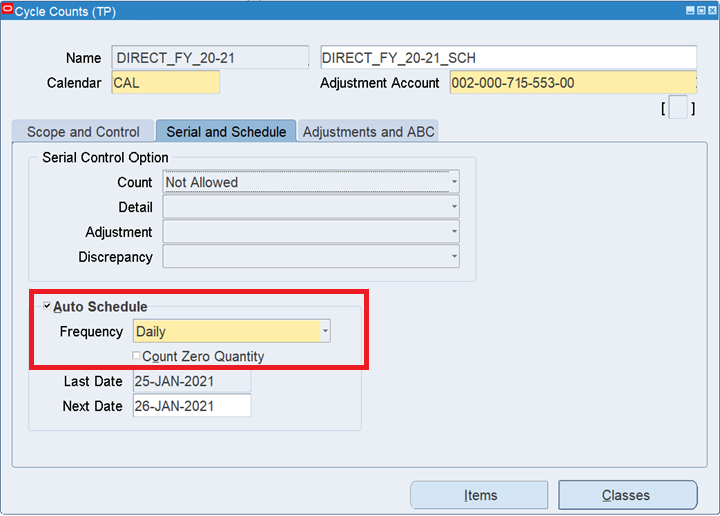


Cycle count screenshot (Serial and Schedule tab)


We can use “Cycle count schedule requests report” to find which part numbers were picked on which date, all may not appear for Cycle count entry if ‘Count Zero Quantity’ check box is not selected. 


Schedule

 Date      Source         DueDate   Item                Description                 

 --------- -------------- --------- ------------------ -------------------------

 25-JAN-21 Automatic      27-JAN-21 Z690062             VALVE,EXHAUST

 25-JAN-21 Automatic      27-JAN-21 Z996777             GASKET,CYLINDER HEAD

 25-JAN-21 Automatic      27-JAN-21 Z991960             SENSOR,PRESSURE

 25-JAN-21 Automatic      27-JAN-21 Z069661             PISTON,ENGINE

 25-JAN-21 Automatic      27-JAN-21 K600806             VALVE,EXHAUST THROTTLE

 25-JAN-21 Automatic      27-JAN-21 L621968             MANIFOLD,EXHAUST

 25-JAN-21 Automatic      27-JAN-21 P621860             TUBE,TUR OIL SUPPLY

 25-JAN-21 Automatic      27-JAN-21 J621861             TUBE,TUR COOLANT SUPPLY

 25-JAN-21 Automatic      27-JAN-21 D621862             TUBE,TUR COOLANT DRAIN

 25-JAN-21 Automatic      27-JAN-21 G622071             TUBE,PRESSURE SENSING

 Below are some of the Oracle support articles you may refer for detailed understanding and these are referred to make this article.

FAQ How Cycle Counting Works and How to Ensure that Cycle Counts are Scheduled Based on Setup Class and Frequency to Meet Audit Requirements (Doc ID 416149.1)


R12 and 11i Troubleshooting Guide for All Cycle Count issues: No Data Returned or Cycle Count Not Picking Up Enough Items (Doc ID 732843.1)


Define Cycle Count and Set Cycle Count Classes [199619.1]

Schedule and Perform Full Cycle Count [199620.1]

How To Setup and Define a Cycle Count [66634.1]


Click here for more articles on Cycle count


Friday, April 7, 2017

Item classification for GST regime


If above embedded object is not visible then click on Direct Link.


Click here for more articles on India GST implementation in Oracle EBS R12 and Decoding GST for India in Oracle EBS R12 way.


Third party registration for GST in India


If above embedded object is not visible then click on Direct Link.

Click here for more articles on India GST implementation in Oracle EBS R12 and Decoding GST for India in Oracle EBS R12 way.


GST India Tax types, Tax rates, Tax category setup, Claim term


If above embedded object is not visible then click Direct Link.

Click here for more articles on India GST implementation in Oracle EBS R12 and Decoding GST for India in Oracle EBS R12 way

First party registration and Common configuration for GST in India.docx


If above embedded object is not visible then click direct link


GST - Tax Authority Setup in Oracle EBS


If above embedded object is not visible then click on Direct Link.

Click here for more articles on India GST implementation in Oracle EBS R12 and Decoding GST for India in Oracle EBS R12 way.

Wednesday, March 29, 2017

How to make India GST regime tax entry as recoverable in Oracle EBS?


In case in India GST solution by Oracle, the recoverability of tax depended on below three setups. If anyone setup is not in line then it will not be a recoverable tax at document level (say Purchase Order level) and it will flow 

1. Recoverable check box shall be checked at Tax type.
Navigation: Oracle Financials for India > Tax Configuration > Define Tax type


2. Recoverable attribute shall be ‘Y’ in Item classification
Navigation: Oracle Financials for India > Item Definition > Define Item Classification 


3. Claim term should have tax code mapped in it.
  • Here you may mention only Tax Type and Organization name. Thought Tax type is non-mandatory field, if its left blank then recoverability is not enabled.
  • ‘Location’, ‘Item Classification’ and ‘Intended use’ like fields are options. If they are kept NULL then Oracle will all Location / Item class / Intended use

Navigation: Oracle Financials for India > Recovery Management > Define Claim Term


Wednesday, December 21, 2016

Decoding GST for India, Oracle EBS way

Objective of this page is to provide a junction from where people can find their way quickly.

This is an attempt to decode solution offered by Oracle for GST in India.
In this article I am planning to put some important links of documents given by Oracle or created by myself or other generous people who are sharing their efforts.

From myself:

From Oracle


Pre-release Documentation - Phase 2
Document Name
Document Details
This document provides an overview of the capabilities of the phase 2 EBS GST infrastructure including guidance on the features that can be tested based on the scope of this phase.
This document describes how to configure the O2C cycle.
This document describes how to configure the P2P cycle.
This document describes functional flows for Bill of Entry (BOE).
This document describes supported functional flows under IRISO and Inter Org transfer.
This document describes supported functional flows under OSP.
This document describes setups for configuring TDS under the new architecture.
This document describes the procedure for importing taxes from third-party applications to AR and AP Modules in Oracle Financials for India.
This document describes the functional flows and setup procedures for configuring Oracle Financials for India Block of Asset functionality in the Fixed Asset (FA) module.
This document provide guidelines to calculate taxes on transactions initiated from modules that are not localized once it is imported to AR or AP modules.


Below are links to India GST video recordings that provide detailed step-by-step implementation details.

Few more articles from Oracle

From other sites / blogs

Coming soon....

Wednesday, May 18, 2016

How to cancel / terminate / abort workflow in Oracle R12?

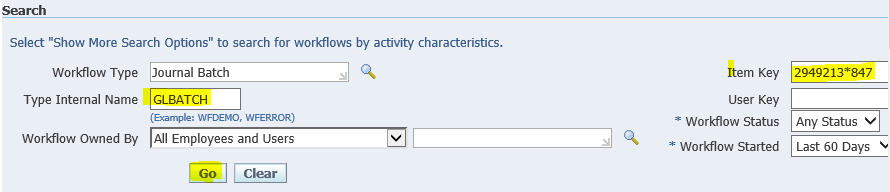
One way is to do it using API WF_ENGINE.ABORTPROCESS by wrtting a simple script like below…


BEGIN
  WF_ENGINE.ABORTPROCESS ('GLBATCH', ' 2949213*847');  
-- wf_engine.ABORTPROCESS ('Type Internal Name', 'Item Key');
END;


COMMIT;


Another way which I think is more appropriate than API is to do it from front end… to perform below steps you need to have workflow admin access.


Step 1: Query the workflow and click on ‘Activity History’ button
cid:image002.jpg@01D1B117.666452B0


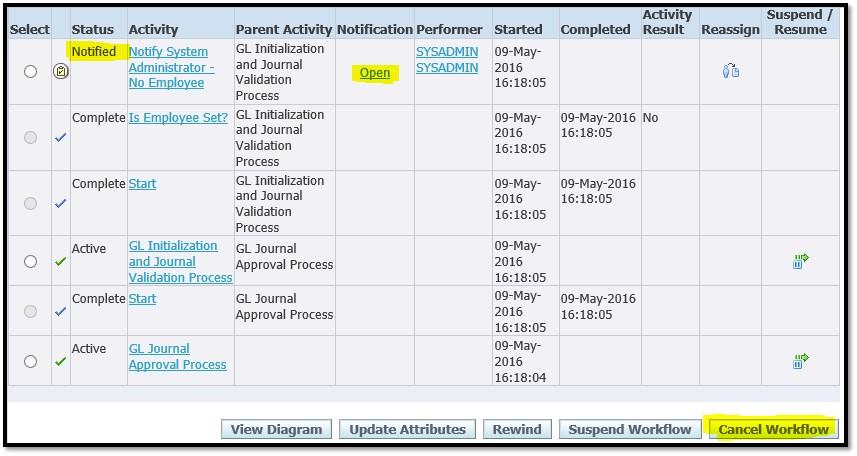
Step 2: Click on ‘Cancel Workflow’ button
cid:image010.jpg@01D1B117.666452B0
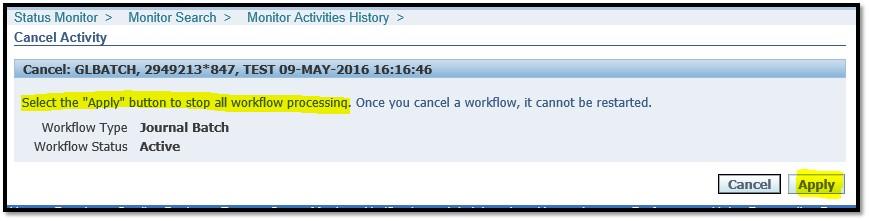
Step 3: Click on ‘Apply’ button
cid:image011.jpg@01D1B117.666452B0


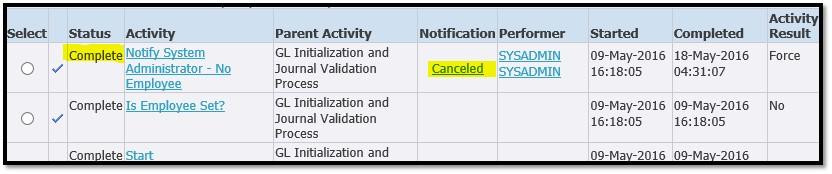
Step 4: Re-query workflow, verify if workflow is cancelled
cid:image013.jpg@01D1B117.666452B0
Step 5: Open ‘Activity History’ and verify if open notification is closed / complete
cid:image015.jpg@01D1B117.666452B0

Thursday, April 28, 2016

Letter of credit (LC Matching) feature in Oracle R12


Background of Letter of Credit (LC):
letter of credit is a letter from a bank guaranteeing that a buyer's payment to a seller will be received on time and for the correct amount. In the event that the buyer is unable to make payment on the purchase, the bank will be required to cover the full or remaining amount of the purchase.

In Oracle R12, this feature is a part of India Localization and it works at the customer level. It is different than Credit Check functionality available in base apps.

Let’s see how it works in system:
Say I want to ship material of amount for which customer has given be LC.

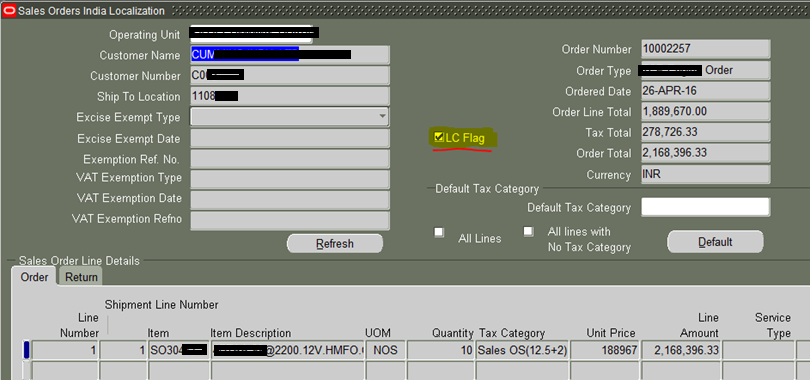
While saving the sale order make sure ‘LC Flag’ is selected in ‘Sales Order India Localization’ form.
Rest of the process of entering/booking sales order is normal.

* We will try to ship only one quantity
Perform below steps
  1. Split the line to 1 qty.
  2. Pick release order line


Now try to ship confirm the shipment.
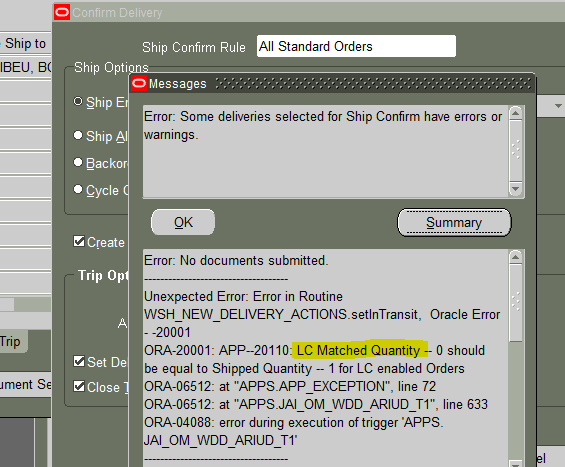
Though at sales order level ‘LC Flag’, we did not match the LC with this shipment. In such cases, shipment will not go thru, system will show below error and the time of ship confirm.
cid:image004.png@01D19FB4.CD137870


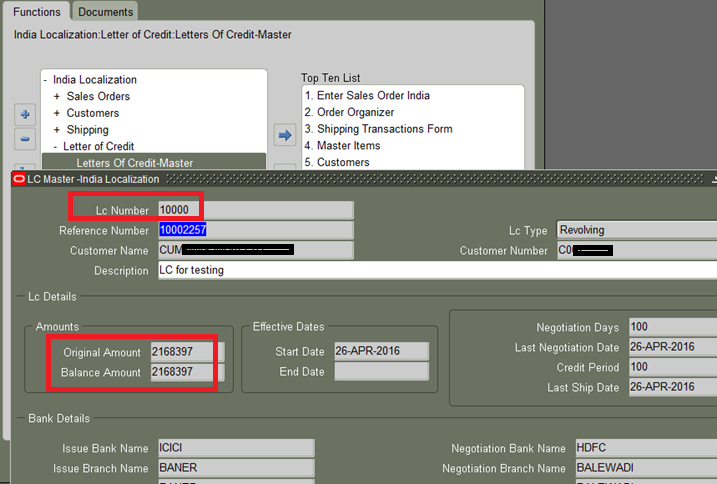
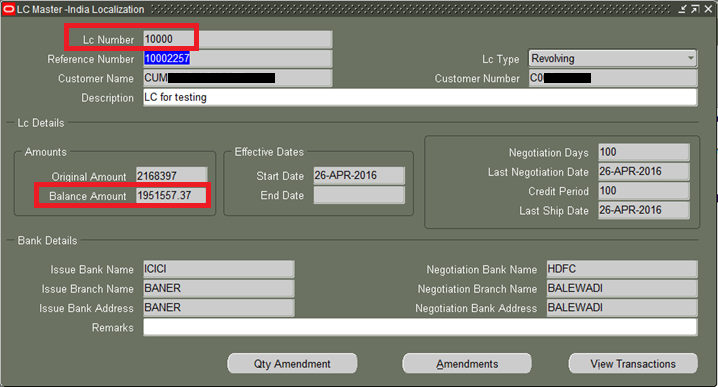
Below is the form where we can create LC in system. As and when LC is applied to shipments, ‘Balance Amount’ value would get reduced.
Note: LC amount shall be inclusive of tax amount. Example: If sale order line amount is 100 and taxes on that line is 10.23, then LC need to be created of amount equal to or more than 110.23

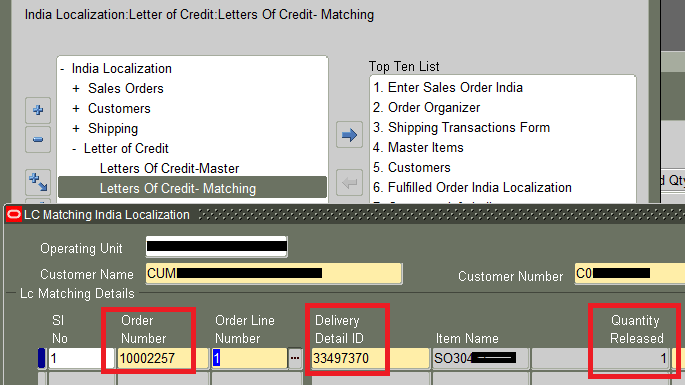
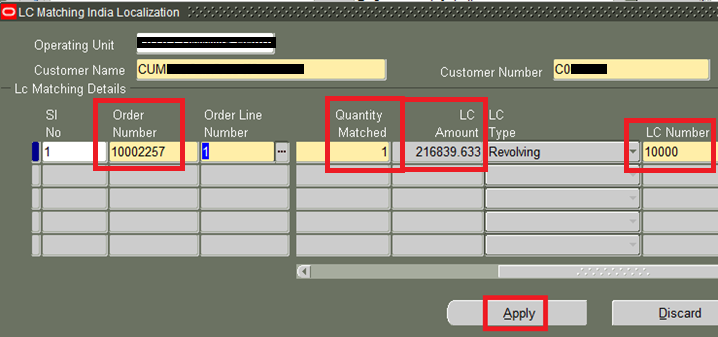
Below is the screen where we can apply LC to order shipment, it is applied at Delivery details ID level.


Scroll to right side to see more columns. Feed all required details and click on ‘Apply’ button.

Once LC is applied to the line, balance amount of LC shall reduce by applied amount. Let’s verify it.

1
Sales Order base price
188967.00
2
Taxes
27872.63
3
Sales Order line total (1+2)
216839.63


1
LC amount
2168397.00
2
Sales Order line total
216839.63
3
LC balance amount (1-2)
1951557.37


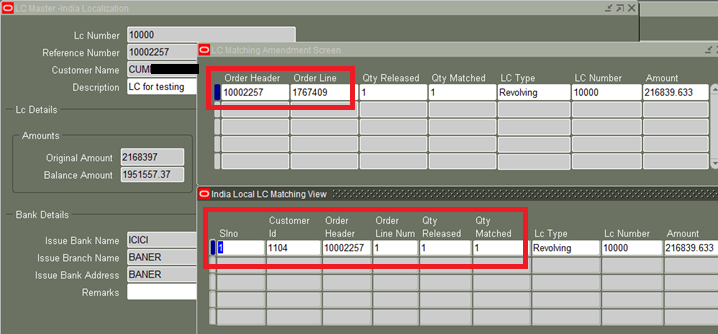
Transactional details of LC will be available if you click buttons at bottom of the form… like ‘Qty Amendment’, ‘View Transaction’


Now as LC is applied to the shipment, system will allow to ‘Ship Confirm’.


You may be interested in below article as it given insight of accounting of LC.

Please add your valuable feedback / comments

Declaimer:

This blog is purely personal and the thoughts expressed here represent only me. The purpose of this blog is to share information and knowledge about Oracle's product which I have come across with my exposure to the product, practice and observations. The blog has been created keeping only one intention of sharing knowledge and for learning purpose. The blog has been created solely as a educational, for storing portions of the vast Oracle knowledge world. Oracle EBS is an Oracle Corp. product and you should contact Oracle directly for any specific fact or issue.

*NOTE: Few articles on this blog are not completely prepared by me, content is edited and complied after referring various sites to make visitor's job easy