Bookmark and Share Subscribe You may face visibility problem if http://docs.google.com is blocked on your network
Showing posts with label Oracle Pricing. Show all posts

Thursday, October 13, 2011

How does promotions work in Oracle EBS


Many companies need to give promotional offers to the customers. This article is related to such kind of scenarios and tries to get initial path to define promotions in system.

Discount Rule Example
Buy N of X, get Y at Z% off Buy 2 (=N) pair of jeans (=X), get a sweater (=Y) at 50% (=Z) off.
Buy N of X, get Y at Z$ off Buy 1 (=N) suit coat (=X), get a dress shirt (=Y) for $10 (=Z) off.
Buy N of X, get Y for Z$ Buy 2 (=N) shirts (=X), get a pair of pants (=Y) for $10 (=Z).
Buy N of X, get highest priced X at Z% off Buy 3 (=N) items (=X), get 10% (=Z) off the highest priced item.
X can be N of the same or different items.
Item A is $19.99, item B is 15.99, item C is 10.00.
Since item A is the
highest priced item, $1.99 (10% of $19.99) is taken off the total.
Buy N of X, get lowest priced X at Z% off Buy 3 (=N) items (=X), get 10% (=Z) off the lowest priced item.
X can be N of the same or different items.
Item A is $19.99, item B is $15.99, item C is $10.00.
Since item C is the
lowest priced item, $1.00 (10% off $10.00) is taken off the total.
Buy $N or more of X, get item Y at Z$ off Buy $20 (=N) of Sporting Goods (=X), get $10 (=Z) off a
basketball item (=Y).
Buy $N or more of X, get Y at Z% off Buy $20 (=N) or more of Sporting goods (=X), get 10% (=Z) off a baseball cap (=Y).
Buy $N or more of X, get Y for Z$ Buy $500 (=N) or more of jewelry (=X), get a pair of earrings (=Y) for $25 (=Z).
Group Discount Example
Buy N of X for Z$ Buy 2 (=N) pair of jeans (=X), get them for $50 (=Z).
Buy N of X for Z% off Buy 3 (=N) pair of jeans (=X), get 35% (=Z) off the total.
Buy N of X for Z$ off Buy 3 (=N) pair of jeans (=X), get $25 (=Z) off the total.
Buy N or more of X for Z% off Buy 3 (=N) or more pairs of jeans (=X), get 35% (=Z) off the total.
Buy N or more of X for Z$ each Buy 3 (=N) or more pairs of jeans (=X), get them for $25 (=Z).


We will try to cover few of the above scenarios.
Note: Above scenarios are just to understand different requirements of promotions. All scenarios are not supported by Oracle applications.


Let’s start with the setup now:

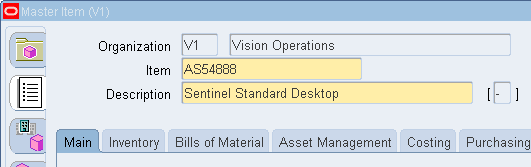
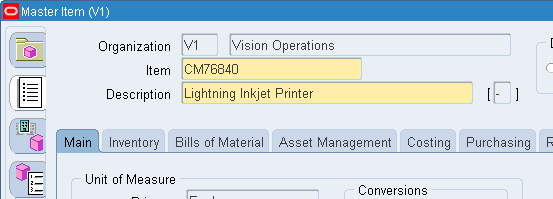
Define Items.
Computer Item:


Printer Item:

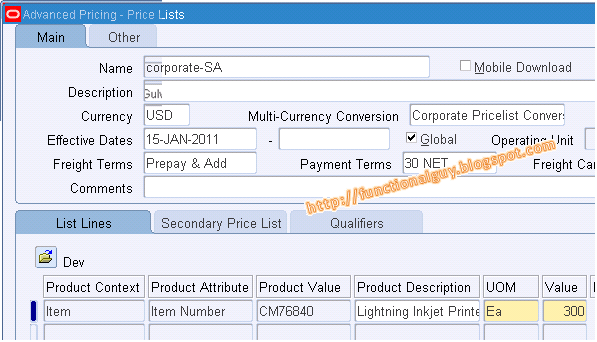
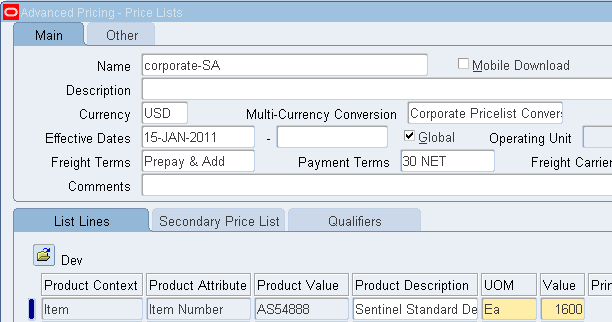
Step 2:  Assign the prices to those item on price list


Scenario 1:
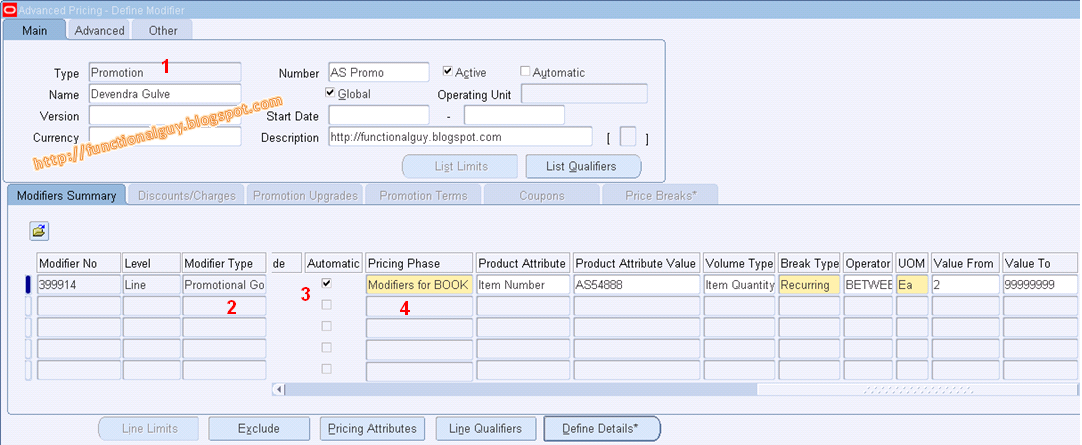
If a customer buys computer AS54888 (Sentinel Standard Desktop) with qty more than 2 then CM76840 (Lightning Inkjet Printer) shall be give at Discount of 40%.

  1. Create a modifier with type Promotion
  2. Choose modifier as Promotional Goods
  3. Automatic check box shall be "yes"
  4. Pricing Phase "Modifiers for BOOK Event"   

Click on "Define Details"

Go to Block "Additional Buy Product"
'Get Product Attribute'=Item Number and "Get product Values"= 'Item to be offered'
Get Qty= Qty to be offered, Get Price from particular Price List
Application Method = Percent and Values= Percentage of Discount (if you put 100% then it will be free)

Enter a Sales Order:

Enter the computer Item AS54888


Book Sales order:
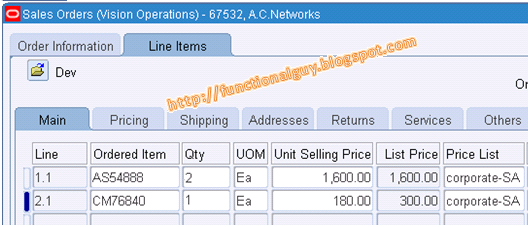

On Booking you will get the discounted item on sales order. This item (printer) gets populated automatically with discount of 40% (List price =300, after discount of 20% it comes to 180)


Scenario 2:
If a customer buys computer AS54888 (Sentinel Standard Desktop) with qty more than 2 then two CM76840 (Lightning Inkjet Printer) shall be give at Discount of amount 111.00. So here CM76840 has a price of 300 per unit, two units are of 600, after discount two CM76840 shall be offered at 489.00 (600.00-111.00)
Or same thing can be expressed as, two qty of CM76840 has be sold at per unit price of 244.50 (489/2).
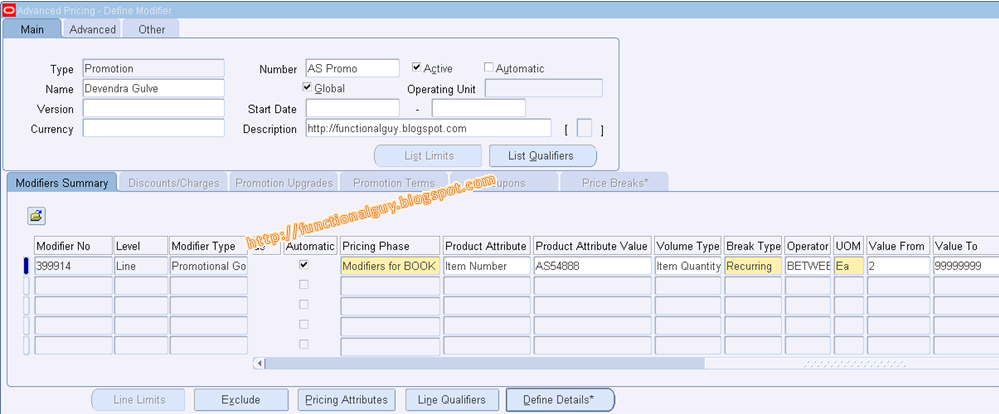

Click on Define Details... 
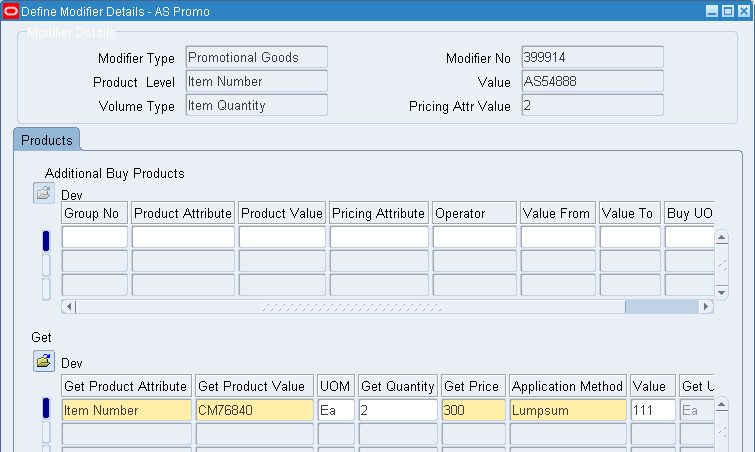

Check the setup by putting sale order in place…
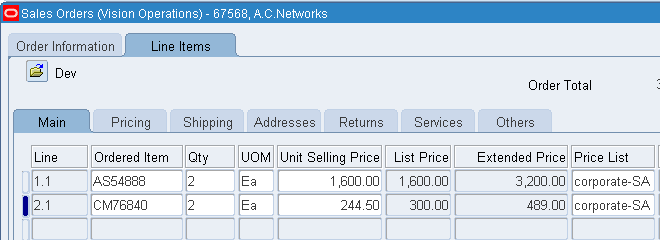


Scenario 3:
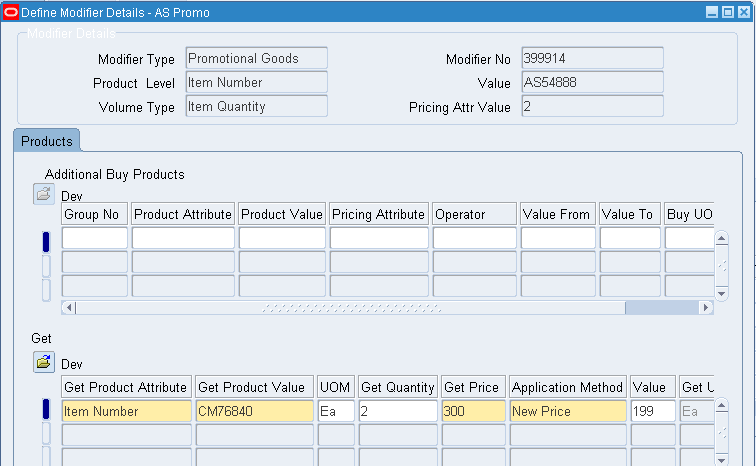
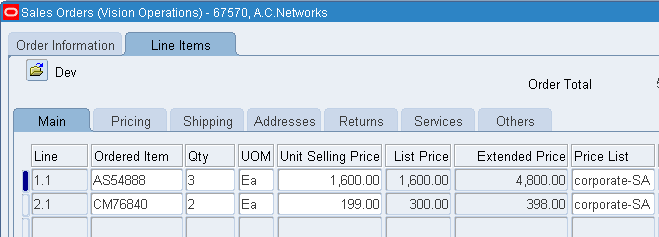
If a customer buys computer AS54888 (Sentinel Standard Desktop) with qty more than 2 then CM76840 (Lightning Inkjet Printer) shall be give at fixed price of 199.00 per unit. So here CM76840 has a price of 300 per unit, two units are of 600 and these should be offer at 398 (199 X 2).
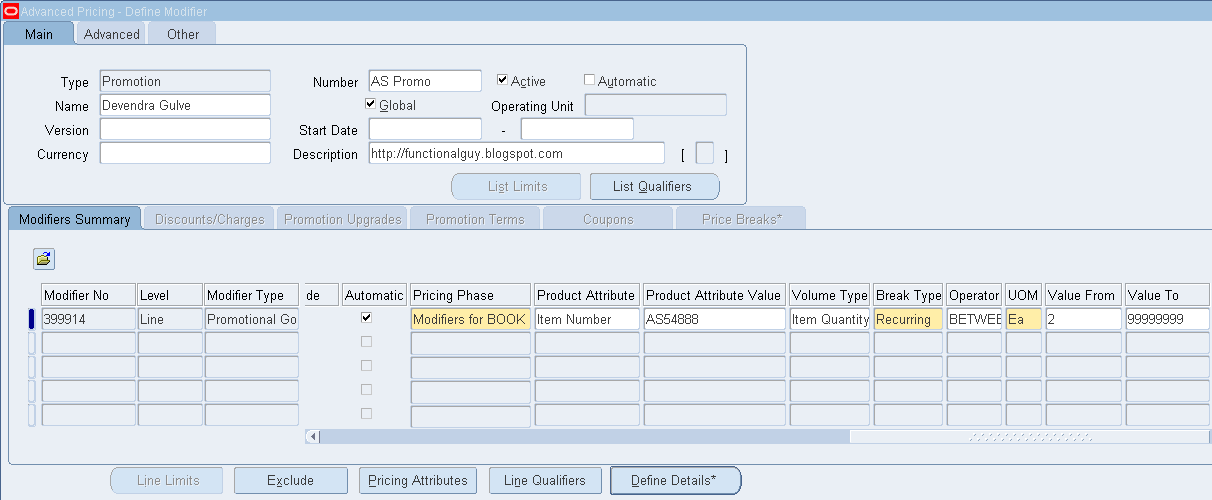


Click on Define Details... 


Check the setup by putting sale order in place…
Thursday, May 19, 2011

Pricing based on quantity range without Price Break feature


Goal
How to setup to make a price list line only eligible to a sales order if the line item quantity is at a certain value or range.

Does not want to use price break header functionality because if the item quantity is not in the range, then the pricing engine should look for a different price list.


Solution
To implement the solution, please execute the following steps:
     1.    Navigate to: Oracle Pricing Manager (R) > Setup > Attribute Management > Context and Attributes
     2.    Query on:
      Type: Pricing Attribute, Code = PRICING ATTRIBUTE, Name=Pricing Attribute
     3.     Add a record as follows:
      Code: DEV_PRC_BRK (any unique name)
      Name: functionalguy.blogspot.com
      Column Mapped:PRICING_ATTRIBUTE7 (select one appropriate for the instance)
      Value Set: QP: Number

     4.    Save the changes done.

     5.    Navigate to: Setup > Attribute Management > Attribute Mapping and Linking
Query: Pricing Transaction Entity = Order Fulfillment & Context Type: Pricing Context
Place the cursor on Code = PRICING_ATTRIBUTE

     6.    Click on 'Link Attributes'
Add a pricing attribute:
      Code: DEV_PRC_BRK
      Level: LINE
      Attribute mapping method: ATTRIBUTE MAPPING

     7.    SAVE the record.

     8.    Click on Attribute Mapping (button) to Enter:
        Application name = Advanced pricing
        Under line level enter:
        User Source Type: PL/SQL API
        User Value String: OE_ORDER_PUB.G_LINE.ORDERED_QUANTITY


     Save the changes done

     10. Run a concurrent program. From the top menu bar, select Tools > Build Attribute Mapping Rules

     11. Now pull up the price list
      Query the price list line for the item (example: AS54888) and add pricing attribute information
 as it will now be available in the list of values.
      Add a second line for this item and the quantity it applies to by entering the
 newly created pricing attribute. Remember, always add a line along with Pricing Attribute and then SAVE the record.


Let’s see the Pricing attributes values in details for each price list line:


     12. Recommended step : Run QP: Maintains the denormalized data in QP Qualifiers
      Responsibility = Oracle Pricing Manager


     13. Test the functionality built so far:
      Responsibility = Order Management Super User (or equivalent)
 
      Navigate: Orders, Returns > Sales Orders
      Enter various sales order lines for this item for the various order quantity ranges or value as setup above to confirm that the unit selling price is coming correct.


Reference:  How to Setup to Make a Price List Line Only Eligible to a Sales Order When the Line Item Quantity is at a Certain Value or Range [ID 414254.1]   

Friday, September 3, 2010

Manual / Online Discount at Order Line level

Based on few leading practices of industries user shall not be able to change list price on order directly. Some or the other justification has to be given. The changes has tobe based on some conditions e.g. Customer / Item / Location etc. Oracle does not allow to change price directly on order line.

 
In many case user want to change the price on Sales Order line directly without going to some other window and then put some entries. In this case we need to do some setup which enables this functionality, which is called as “Manual / Online Discount”

 
Below are the steps needs to be done to enable Manual / Online Discount at Order Line level:
  1. Define one Manual Modifier List (uncheck Automatic at header level), although it not mandatory at header level.
  2. Select Header type as "Discount List"
  3. Define one Manual Modifier line (uncheck Automatic at line level) Required
  4. Select checkbox for field ‘Override’ (in Modifier Summary Tab)Required
  5. Select appropriate ‘Pricing Phase’ (in Modifier Summary Tab)
  6. Select ‘Product Attribute’ and ‘Product Attribute Values’ is you want to restrict this to specific cases only.
  7. Populate the field ‘Application Method’ with appropriate value.
  8. Populate either of ‘Values’ or ‘Formula’ field.
  9. If you have any other condition to restrict use of online discount, then use the other field as well as you can use Qualifier to enable extended conditions / filter.
  10. Run ‘Build Attribute Mapping Rules
  11. Now User must be able to change to price column value directly on Sales Order form.
  12. If multiple modifiers exist for manual application, then one pop-up opens showing all eligible modifier and user need to select the desired modifier. (No pop-up in case of single manual modifier)


Tuesday, May 20, 2008

Oracle Pricing.... (Qualifier and Modifier)

Oracle Pricing (Qualifier & Modifier)

Oracle Advanced Pricing provides a logical, flexible setup framework to handle complex pricing scenarios. It enables to break price creation into simple elements: define pricing rules, assign rules to create specific pricing actions, and designate pricing controls. Oracle Advanced Pricing also supports tailored pricing with built-in extensibility features.
Oracle Advance Pricing is part of Oracle Order Management, and integrates seamlessly with other Order Management applications, including Configurator and Order Management.
REQUIRMENT: For customer Bigmart (Customer Number 1168) give 10% discount on the unit price of the items present on sales order.
To fulfill this requirement one Qualifier and one Modifier need to be defined.
Pricing qualifiers controls, who is eligible for certain prices (price lists) and benefits.
The modifier provides price adjustments such as discounts, price breaks, surcharges, coupons, item and term substitutions, and other item discounts. Discount and surcharges modifiers affect the selling price; freight charge modifiers do not affect the selling price.
Now first qualifier needs to be defined and at time of defining modifier this qualifier needs to be attached to the modifier. Qualifier qualifies the pricing request and modifier modifies that.
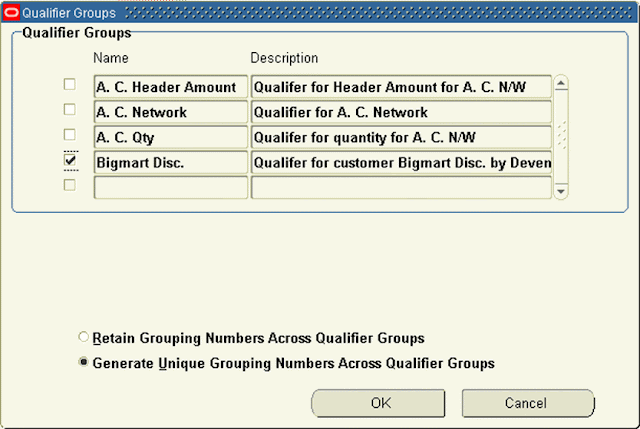
Define Qualifier: Bigmart Disc.


As this qualifier is newly defined we need to run one concurrent request “Build Attribute Mapping Rules”. This request needs to be run on defining new qualifier, it is always recommended to run the same after doing change in the qualifier.


Defined Modifier: Disc. Bigmart


The requirement is to give 10% to all the line. So select Level as ‘Line’ to apply modifier at line level. Even though it is for all the lines there is a difference in giving 10% discount at all lines level and giving discount at header level. If it would be at Header level 10% will be given to charges also along with items. Also provide all other values relevant to the requirement as shown.


>

Attach Qualifier to the modifier: Click on ‘Line Qualifiers’ button to attach “Bigmart Disc.” to “Disc. Bigmart”.


Sales Order 56771 is entered before creating the Modifier:


Sales Order 56772 is entered after creating the Modifier:


See the difference in prices at line level on two Orders. On sales order 56772 unit price is 1,439.10, which came after 10% discount on the real price (i.e. 10% discount on 1599.00) and on Sales Order 56772 unit price is 1,599.00

Please add your valuable feedback / comments

Declaimer:

This blog is purely personal and the thoughts expressed here represent only me. The purpose of this blog is to share information and knowledge about Oracle's product which I have come across with my exposure to the product, practice and observations. The blog has been created keeping only one intention of sharing knowledge and for learning purpose. The blog has been created solely as a educational, for storing portions of the vast Oracle knowledge world. Oracle EBS is an Oracle Corp. product and you should contact Oracle directly for any specific fact or issue.

*NOTE: Few articles on this blog are not completely prepared by me, content is edited and complied after referring various sites to make visitor's job easy